
A washing machine is one of the most relied-on appliances in any household. When it suddenly malfunctions or stops working correctly, it can disrupt your daily routine and leave laundry piling up quickly. Maytag washers are known for their durability and advanced features, but like any modern appliance, they may occasionally require a reset to restore proper function.
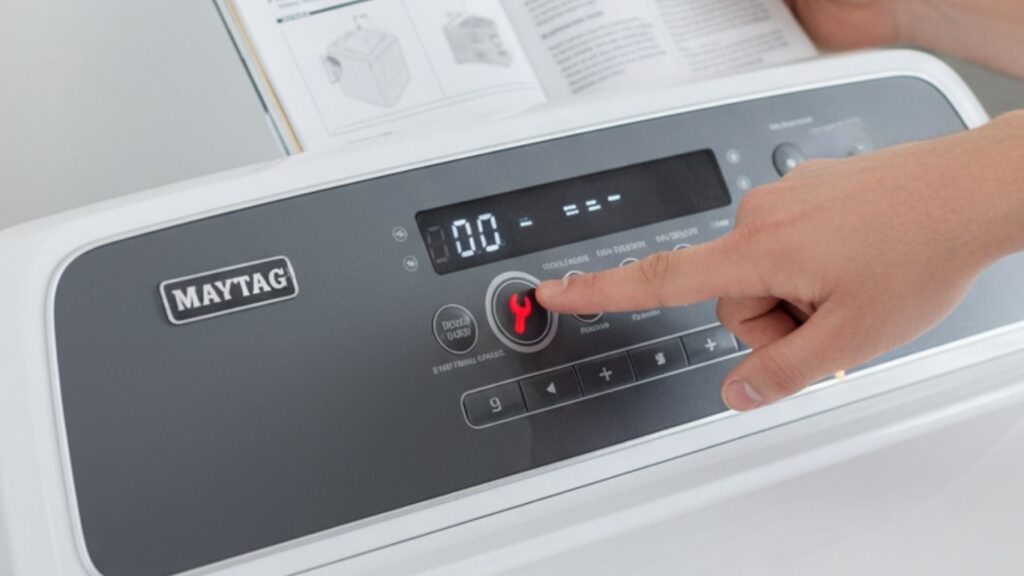
Resetting your Maytag washer can often resolve issues such as error codes, unresponsive controls, or cycles that won’t start or complete. This guide will walk you through everything you need to know about resetting your washer, troubleshooting common problems, and ensuring your machine continues to run smoothly for years to come.
Why Resetting a Maytag Washer is Important
Fixing Temporary Glitches
Sometimes, your washer may experience minor electronic hiccups. A reset clears these temporary errors and restores normal operation.
Clearing Error Codes
Modern Maytag washers display error codes when something goes wrong. Resetting can help clear these codes once the underlying problem is fixed.
Restoring Cycle Function
If your washer gets stuck mid-cycle or refuses to advance, a reset often restarts the program without needing a technician.
Saving Time and Money
Before calling customer service or scheduling a repair, trying a reset is a quick, cost-effective first step.
Signs That Your Maytag Washer Needs a Reset
Not every issue requires a reset, but these common symptoms often indicate it’s time:
- Washer not starting when powered on.
- Display showing random or persistent error codes.
- Control panel unresponsive to button presses.
- Washer stuck mid-cycle and won’t advance.
- Unusual noises without mechanical problems.
- Washer finishes a cycle but doesn’t unlock or drain properly.
Types of Maytag Washers and Their Reset Methods
Different Maytag models have slightly different reset procedures. Knowing your washer type ensures you follow the right steps.
Top-Load Washers
- Often include a lid lock reset feature.
- Use button sequences to initiate reset.
Front-Load Washers
- Typically feature a control lock system.
- Reset involves unplugging or holding certain buttons.
High-Efficiency (HE) Washers
- Equipped with advanced electronic controls.
- May require a combination of power cycling and button pressing.
General Step-by-Step Reset Method
Most Maytag washers can be reset using this universal method.
Step 1: Power Off the Washer
- Turn the washer off using the control panel.
- If unresponsive, move to unplugging.
Step 2: Unplug from Power Source
- Remove the plug from the electrical outlet.
- Leave unplugged for at least one minute.
Step 3: Reconnect Power
- Plug the washer back in.
- Wait a few seconds for the system to reboot.
Step 4: Start a Test Cycle
- Select a small load or rinse/spin cycle.
- Observe if the washer functions normally.
Alternative Reset Methods for Maytag Washers
Method 1: Button Combination Reset
Some models allow a reset by pressing a sequence of buttons.
- Press and hold the Start/Pause button for 3–5 seconds.
- Release, then press it again for 3 seconds.
- Wait for the washer to beep or display reset confirmation.
Method 2: Power and Lid Sequence Reset
For top-load models:
- Unplug the washer for 1 minute.
- Plug it back in and open/close the lid six times within 12 seconds.
- Wait for the washer to reset.
Method 3: Factory Reset
Certain advanced models support a full factory reset.
- Hold the Power and Cancel buttons together for 10 seconds.
- Release when the lights blink or display resets.
Resetting After Error Codes
Each error code points to a specific problem, but sometimes after fixing the cause, the code lingers. Resetting clears these codes.
Common Error Codes
- F01: Main control board issue.
- F02: Drainage problem.
- F05/F06: Water temperature or motor control fault.
- F09: Overflow condition.
- F21: Long drain time.
Resetting helps confirm whether the issue is resolved or if further action is required.
When Resetting Isn’t Enough
Resetting may not solve every issue. If problems persist, you may need deeper troubleshooting.
Washer Still Won’t Start
- Check the power supply and circuit breaker.
- Ensure the lid or door is closed properly.
Drainage Issues Continue
- Clean the drain pump filter.
- Inspect hoses for kinks or blockages.
Error Codes Reappear
- Persistent codes often indicate part replacement is necessary.
- Contact a technician if the same code appears repeatedly.
Troubleshooting Guide for Maytag Washers
Power Problems
- Ensure the outlet has power by testing another appliance.
- Reset the circuit breaker if tripped.
Water Supply Issues
- Verify hot and cold water valves are fully open.
- Inspect hoses for bends, leaks, or blockages.
Spin and Agitation Failures
- Overloaded drum may prevent proper spinning.
- Redistribute laundry for balance.
Excessive Vibration
- Check if the washer is level on the floor.
- Adjust leveling legs if necessary.
Detergent Residue
- Use HE detergent in HE models.
- Run a clean washer cycle monthly.
Preventive Maintenance to Reduce Resets
Clean Regularly
- Wipe the door gasket and drum.
- Clean the detergent dispenser.
Avoid Overloading
- Stick to the recommended load size.
- Overloading stresses the motor and causes cycle errors.
Keep Firmware Updated
Some advanced Maytag models can receive software updates. Check if updates are available for your washer.
Inspect Power Source
- Ensure the outlet provides consistent voltage.
- Avoid using extension cords.
Safety Tips Before Resetting
- Always unplug before performing a reset involving lid or button sequences.
- Keep hands dry when handling electrical components.
- If the washer shows burning smells or sparks, do not attempt to reset—disconnect and call for service.
Expert Tips for Effortless Resetting
- Keep your owner’s manual handy for model-specific reset instructions.
- Practice the lid-open reset before you urgently need it.
- After resetting, always run a short test cycle to ensure full functionality.
- If the washer locks during reset attempts, wait a few minutes before trying again.
Common Mistakes to Avoid
- Forcing buttons or holding longer than recommended.
- Ignoring repeated error codes.
- Skipping maintenance cycles.
- Overloading the washer right after a reset test.
Benefits of Knowing How to Reset Your Washer
- Saves money on unnecessary service calls.
- Minimizes downtime when laundry piles up.
- Extends the washer’s lifespan by handling glitches early.
- Gives you more confidence in managing appliance issues independently.
Frequently Asked Questions
How long should I unplug my Maytag washer to reset it?
At least one minute is recommended, though waiting 5 minutes ensures a complete discharge of residual power.
Can resetting fix all Maytag washer issues?
No. Resetting resolves minor glitches and clears codes but won’t repair mechanical failures.
Is it safe to reset my washer frequently?
Yes, but frequent resets may indicate an underlying issue that requires inspection.
Will resetting erase custom cycles or settings?
On some models, yes. Factory reset returns the washer to default settings.
Why won’t my washer reset after unplugging?
Ensure you follow the sequence correctly. If still unresponsive, a control board issue may be the cause.
Final Words
Resetting your Maytag washer is one of the simplest yet most effective ways to troubleshoot common issues. From clearing stubborn error codes to reviving unresponsive controls, knowing how to reset your machine can save you both time and money.
While resets work well for temporary glitches, remember that persistent problems may require deeper troubleshooting, professional repair, or part replacement. Combining proper reset techniques with regular maintenance ensures your washer delivers dependable performance for years.
By following the ultimate troubleshooting guide outlined here, you’ll be well-prepared to keep your Maytag washer running efficiently and smoothly—turning laundry day back into a stress-free routine.